



Want to display accurate sun and moon times on your WordPress business site — including sunrise and sunset, golden hour, solar noon, moonrise, moonset, and moon phases? It’s easier than you think.
Whether you run a tourism site, an event business, or a local service, showing daily sun and moon times can help users schedule outings and create memorable experiences. You can showcase precise astronomical data (Sun & Moon times) by using a dedicated weather plugin like Location Weather, which has a dedicated Sun & Moon times block.
In this post, I’ll show you how to add and display daily sun and moon times on your WordPress site in just a few minutes.
Let’s get started.
What are the Sun & Moon Times?
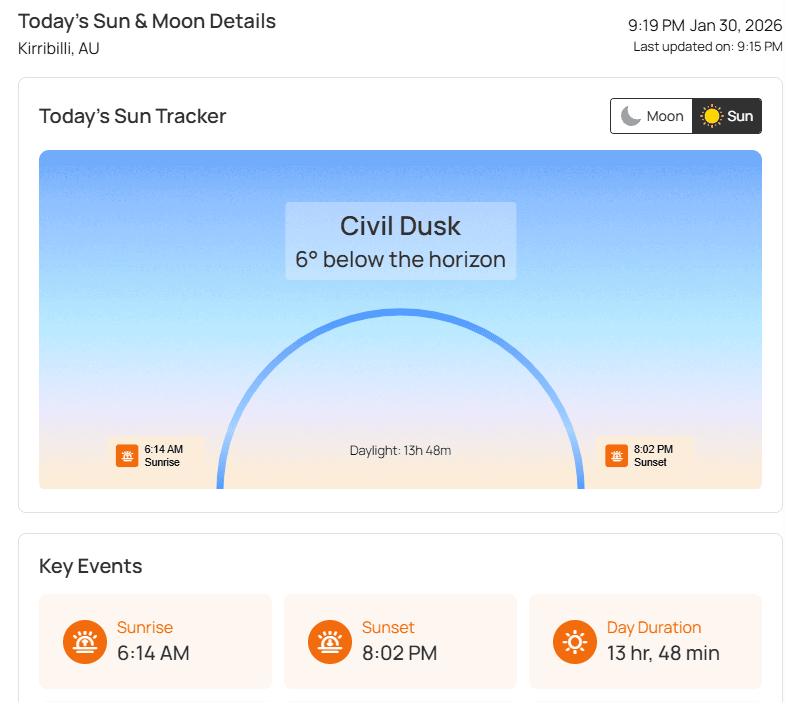
Although we know what sun & moon times are, let’s know further what they mean and are used for as business owners. It refers to precise astronomical data or events that show how the sun and moon move throughout the day and night relative to a specific location on Earth.
Most importantly, these data are useful for scientists to collect research data, including key sun & moon events, and forecasts, photographers for capturing perfect lighting, travelers for planning trips, and businesses to help customers schedule activities more effectively.
Benefits of Displaying Sun & Moon Times on Your Business Website
Showing accurate real-time sun and moon times on any weather-dependent business isn’t just an informative feature — it’s a valuable & practical tool that helps customers plan smarter, while boosting engagement, trust, and conversions.
- Help Visitors Plan Smarter – Sunrise, sunset, and moon phase data enable users to schedule tours, events, and outdoor activities with confidence.
- Perfect for Tourism & Outdoor Businesses – The best times for sightseeing, beach trips, and night experiences are clearly highlighted to attract more customers.
- Attract Photographers & Content Creators – Golden hour and moon phases help photographers and creators plan perfectly timed shoots.
- Enable Advanced Planning with Forecasts – A 16-day sun and moon forecast allows visitors to plan weddings, tours, and outdoor events.
- Increase Engagement & Repeat Visits – Daily-updated astronomical data keeps planners, travelers, and enthusiasts returning regularly.
- Build Trust with Accurate, Scientific Data – Location-based, astronomically calculated data strengthens your site’s reliability and authority.
How to Display Sun & Moon Times in WordPress (4 Simple Steps)
To display Sun & Moon times, first and foremost, you need a weather plugin that gives this flexibility to show such real-time astronomical data as Location Weather. Simply follow the steps below to add and make it live in just a few minutes.
Step 1: Get Location Weather
Location Weather is the leading Weather and Air Quality plugin for WordPress, with the highest number of active installations, reviews, and ratings in its category. As the #1 Weather plugin around the world, it has been featured on popular platforms such as WPBeginner, WP Engine, WPMU DEV, Elegant Themes, and HubSpot. Over 20,000 business owners love Location Weather for its powerful features, easy customization, and responsive support.
Now, with the Sun & Moon Times Block, you can display real-time astronomical data alongside weather information — helping visitors plan outdoor activities, events, photography shoots, or travel with precision.
Key Features:
- 60+ ready-to-use weather patterns library
- 17+ visual drag-and-drop weather blocks for flexible display
- Sun & Moon Times block to display sunrise/set, golden hour, moon phases, etc.
- Display key sun & moon events and up to 16-day forecasts
- Daily/hourly weather forecasts in a sleek pop-up or card
- AQI data, historical weather insights, astronomy information, interactive weather maps, and more
- Location-based weather data with easy unit switching
- Display weather by fixed location, visitor’s location, or custom weather search
- Dynamic backgrounds that change based on live weather conditions
- Full design control with animations, images, videos, or custom color backgrounds
So, don’t wait. Let’s install Location Weather, activate, and add the Sun & Moon Times Block from the ready pattern library, add your API key, choose a template, customize, and publish real-time weather and astronomical data — no coding required.
Step 2: Configure Weather API Key
To fetch accurate astronomical data, we first need to configure a Weather API Key from OpenWeather or WeatherAPI. Follow the steps below to get a free or paid weather API key and set it up in Location Weather.
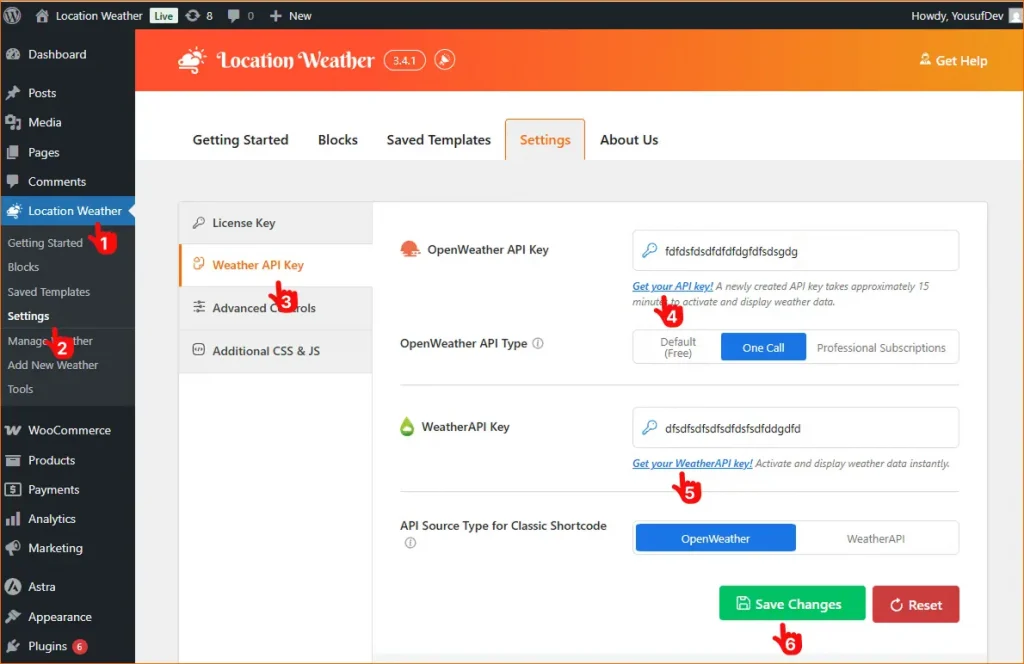
- In your WordPress admin sidebar, click Location Weather.
- Open the Settings panel of Location Weather.
- Navigate to the Weather API Key section.
- Click Get your API key to visit the OpenWeather signup page.
- Create an account with your email.
- Generate the API key, copy it, and paste it into the OpenWeather API Key field.
5. Alternatively, you can add an API key from WeatherAPI using the same process.
6. Click Save Changes to activate your API key.
You can also check out the full guidelines about the Weather API key plans and setup here.
Step 3: Create Beautiful Sun & Moon Times Template
Now it’s time to create your Sun & Moon Times widget to show astronomical data. With 2 pre-designed templates, this ready-to-use Sun & Moon Times block allows you to showcase sun, moon times, or both, including key events such as sunrise, sunset, golden hour, moonrise, and moon phases with a phases timeline card.
Moreover, you can add up to 16 days of sun and moon forecasts in an organized, easy-to-read format, providing detailed insights for photographers, outdoor planners, and astronomy enthusiasts to track key astronomical events directly on your website.
Simply follow the easy steps below or check this guide to create a beautiful sun & moon times showcase & display in minutes.
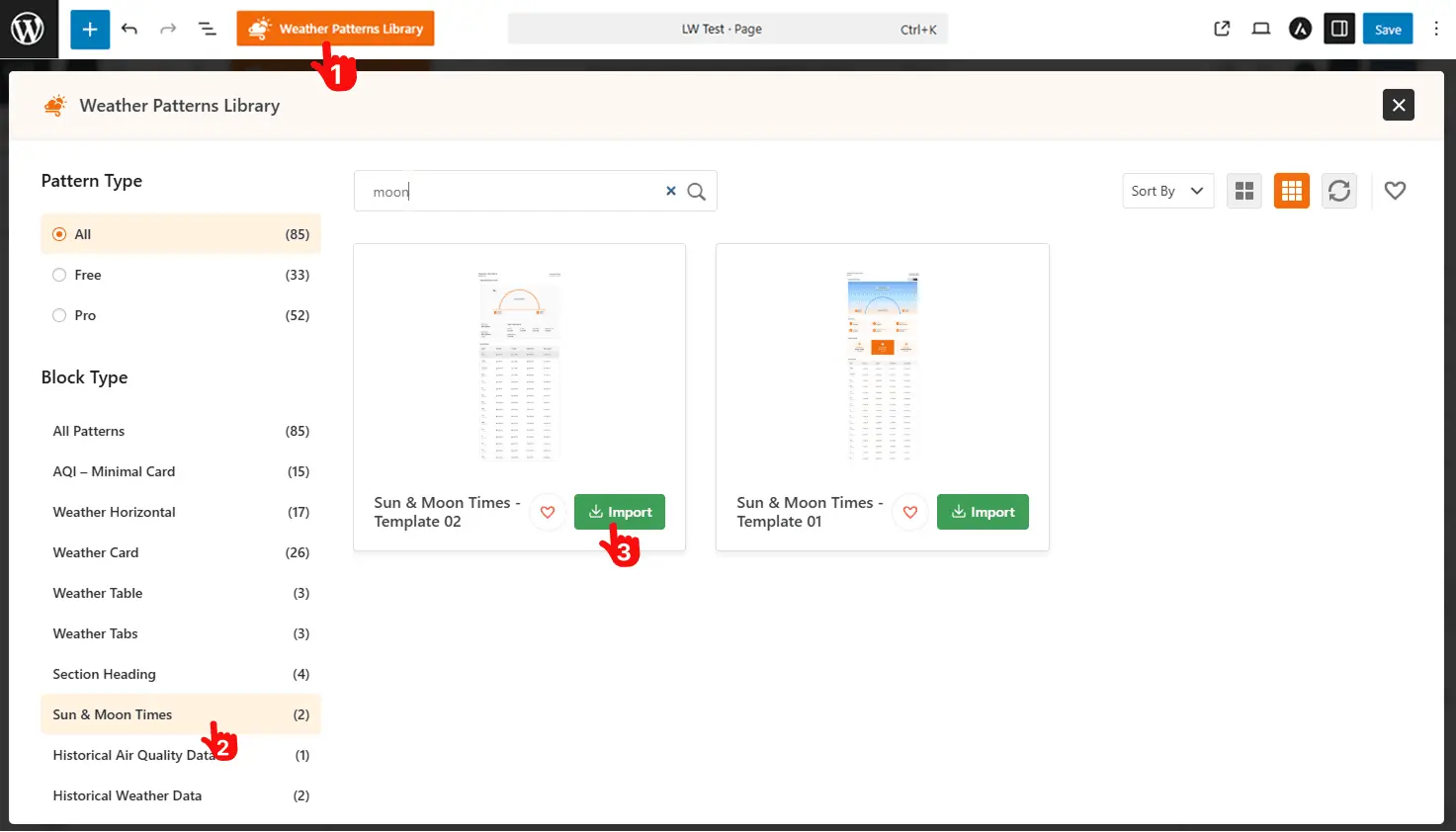
- Open the page or post, then click the (+) Add Block button or choose the Rich Patterns Library. Note: It’s easier to go with the pattern library. Just keep following me.
- Search for or find Sun & Moon Times patterns.
- Click to Import.
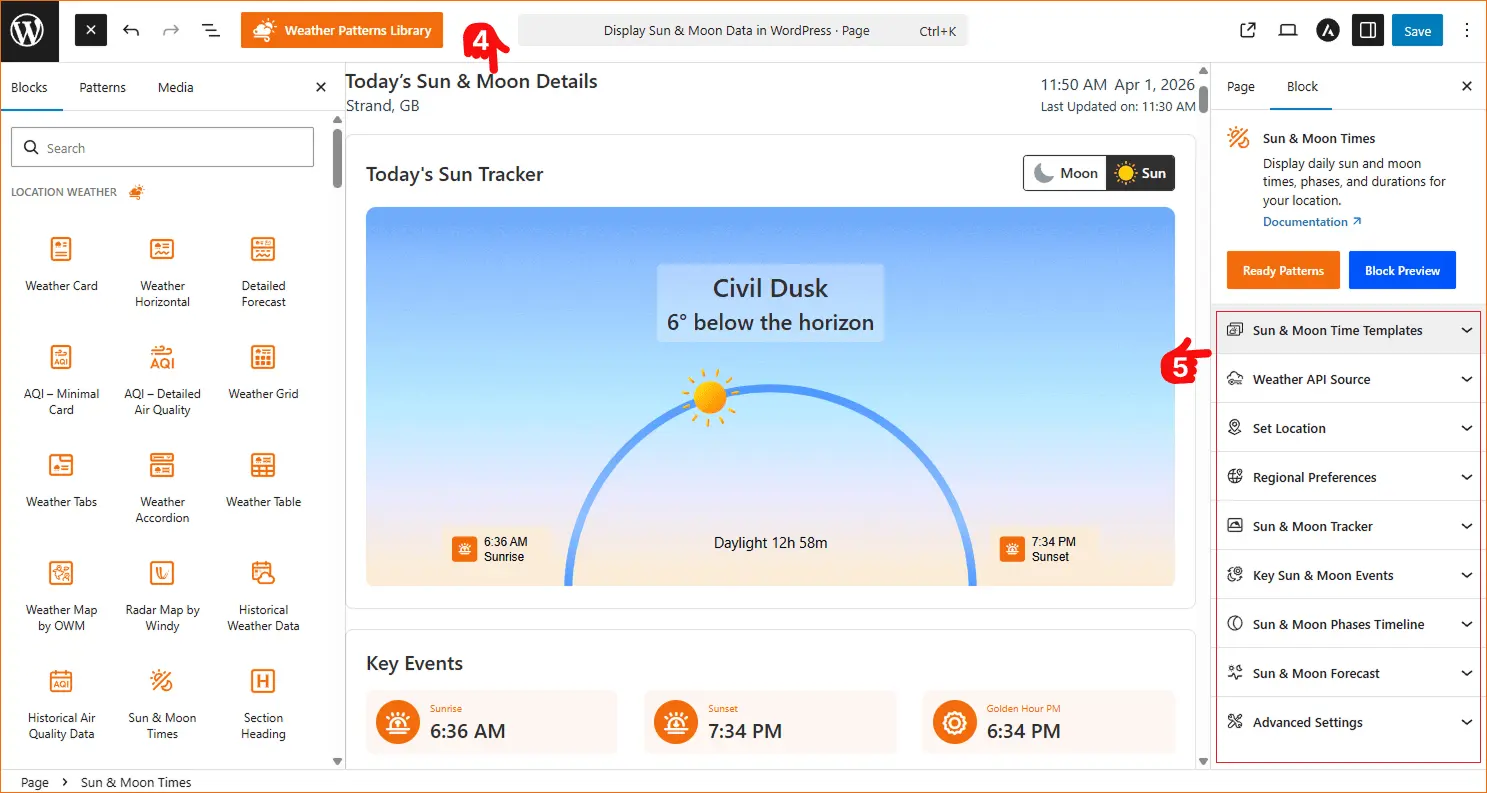
4. Find a beautiful, premade template that will be inserted on your page or post.
5. Find the dedicated panels, including sun & moon tracker, key events, and forecasts, to customize them as you wish.
Step 4: Customize and Publish Your Sun & Moon Times Widget
- Choose Template & Set Location: After inserting the sun & moon times ready templates, choose your desired one from 2 stylish layouts, set the location, and enable custom weather search.
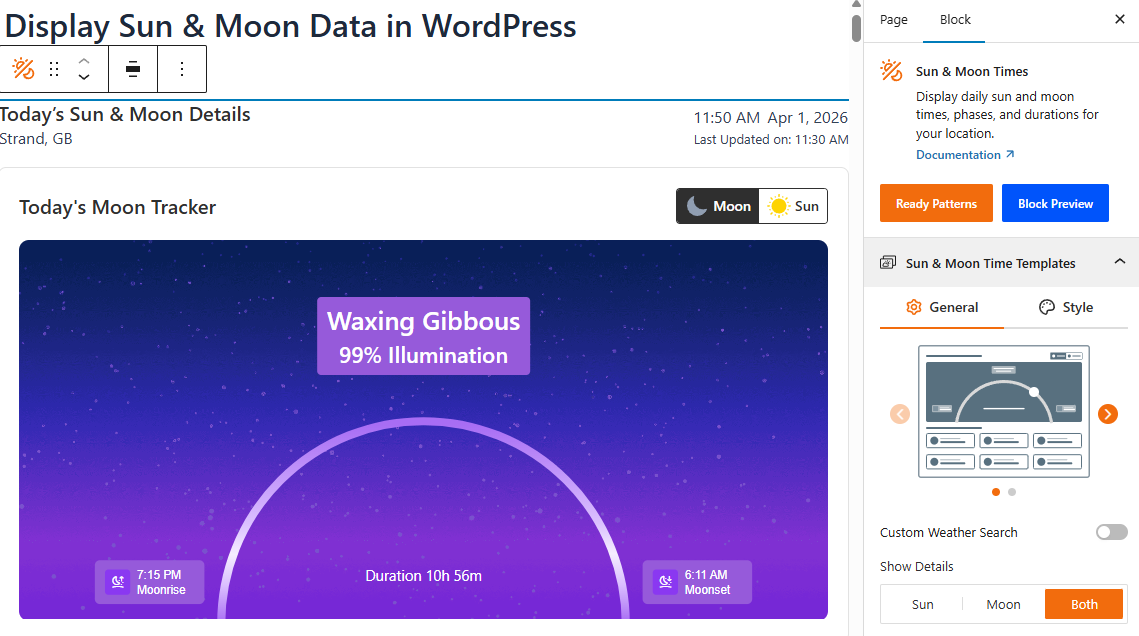
- Sun & Moon Tracker – Show/hide sun & moon times tracker, set heading label, show schedule cards (sunrise, sunset, moonrise, moonset), and display phase title card.
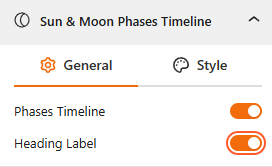
- Phase Timeline – Display a visual timeline of sun & moon phases.
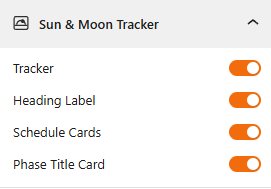
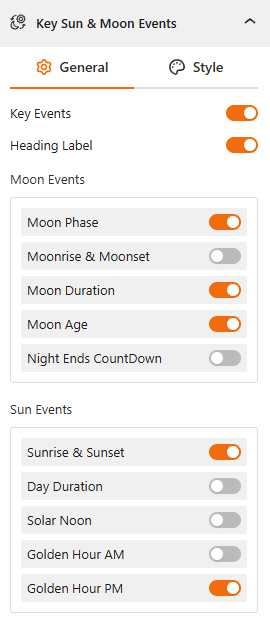
- Key Events – Select which events to show: sunrise, sunset, golden hour, solar noon, moonrise, moonset, and moon phases.
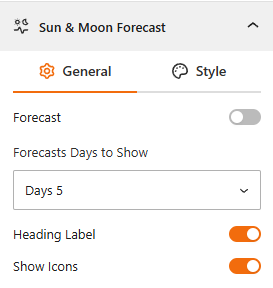
- Forecasts – Show the 16-day sun and moon forecast for advanced planning.
- Global & Custom Stylings– Customize templates, colors, backgrounds, borders, typography, icons, spacing, and layout for a visually appealing display.
- Once finished, click Publish or Update.
That’s it — your sun & moon times will now be visible on your site! Let’s watch a live demo of how the Sun & Moon Times will be displayed on your WordPress website.
Best 5 Tips to Display Sun & Moon Times on Your WordPress Business
- Integrate with key pages – Combine sun & moon times with event, tour, or activity pages (e.g., “Best Sunset Views in Spring”).
- Highlight golden hour – Perfect for photography workshops, wedding planning, or outdoor sessions.
- Use clear visuals – Icons, colors, and structured layouts make the information easy to scan.
- Strategic placement – Add the block to high-traffic areas like your homepage, sidebar, or local guides.
- Enable custom location search – For a global audience, let visitors select their city to see accurate times.
Final Thoughts
Adding sun and moon times with accurate, location-based sunrise, sunset, and moon phases is not just an extra feature; it’s a smart business tool that helps you stay ahead of the competition.
So why wait? Download Location Weather today and turn astronomical insights into real business value, helping your visitors plan smarter, engage more, and return again and again.


Leave a Reply